


Monday morning, 9:00 AM. The CISO walks into the legal department with a grim expression.
“We have a confirmed data leak,” the CISO says. “Proprietary schematics were sent to a competitor. The logs point to Sarah in Engineering. She accessed the files from her iPad last night.”
The General Counsel looks up. “Is it a company-issued iPad?”
“No,” the CISO replies. “It’s her personal device. BYOD policy. We need to seize it and image it immediately.”
“Stop,” the General Counsel warns. “Does that iPad contain her family photos? Her health data? Her banking apps? If we image that device without a warrant or explicit, uncoerced consent, we aren’t just investigating a crime. We might be committing one.”
This scenario is playing out in boardrooms across the globe. The “Bring Your Own Device” (BYOD) revolution has saved companies millions in hardware costs and boosted employee flexibility. But it has also created a forensic minefield.
In the old days, the company owned the BlackBerry, the server, and the network. If an investigation was needed, IT owned the evidence. Today, corporate data lives side-by-side with the most intimate details of an employee’s personal life.
This article explores how organizations can navigate this conflict, balancing the Forensic Readiness needed to protect the business with the Privacy Rights that protect the employee.
The Death of the “Whole Device” Image
Traditional digital forensics relies on a “bit-for-bit” image. To investigate a laptop, you copy the entire hard drive, operating system, deleted files, slack space, everything, and analyze it in a sterile environment.
In a BYOD context, this “nuclear option” is increasingly toxic.
According to NIST Special Publication 800-101 (Guidelines on Mobile Device Forensics), mobile forensic tools are powerful. They can recover deleted text messages, map GPS history, and extract cached social media images. When an employer applies these tools to a personal device, they inevitably collect “Collateral Data”, private information irrelevant to the investigation.
If you image an employee’s personal iPhone to find a stolen PDF, you may also inadvertently collect their medical records or private spousal communications. Under strict privacy laws like the GDPR in Europe or the CCPA in California, this “over-collection” can render the investigation illegal and the evidence inadmissible.
To learn more about the risks of holding toxic data, read our guide on Shadow Data and Silent Failures: Why Your Cloud Strategy Needs a Forensic Upgrade.1 As we covered there, holding data you don’t need, in this case, an employee’s personal photos, turns your forensic archive into a liability.
The Legal Trap: Why “Consent” isn’t Enough
A common rebuttal from IT directors is, “But the employee signed a BYOD waiver. They consented to a search.”
Legal experts warn that this safety net is full of holes.
In the context of employment, “consent” is often viewed by regulators as coerced. If the choice is “sign this waiver or lose your job,” the consent is not freely given. Osborne Clarke, a leading international legal practice, notes in their analysis of GDPR investigations, GDPR: The practical impact on internal investigations,2 that relying solely on consent is risky because it can be withdrawn at any time. If an employee hands over their phone and then says, “I revoke consent,” mid-way through the imaging process, the investigation hits a wall.
Furthermore, courts are increasingly recognizing a “Reasonable Expectation of Privacy” on personal devices, even if they are used for work. The landmark US Supreme Court case Riley v. California3 (2014) unanimously ruled that police generally require a warrant to search cell phones, famously noting that modern cell phones hold “the privacies of life.” While this applies to law enforcement, the ripple effects are felt in civil and corporate law.
The Technical Solution: Containerization and “Logical” Forensics
If we cannot image the whole device, and we cannot rely on blanket waivers, what is the solution?
The answer lies in Containerization and Mobile Application Management (MAM).
Instead of managing the device (MDM), companies are moving to manage the app. In a containerized environment, corporate data lives in an encrypted “sandbox” on the employee’s phone. The Outlook app, the Teams app, and the company SharePoint portal are walled off from the rest of the phone.
From a forensic perspective, this changes the game. It allows for a Logical Extraction limited to the container.
- The Scope: The forensic tool targets only the corporate container.
- The Wall: The tool cannot “see” the personal camera roll, personal iMessages, or HealthKit data.
- The Result: The investigator gets exactly what they need, business emails and access logs, without violating the employee’s privacy.
This approach aligns with the guidance in NIST Special Publication 1800-22 (Mobile Device Security: Bring Your Own Device).4 NIST recommends this “separation of data” not just for security, but to facilitate privacy-preserving incident response. By architecting the device correctly before the breach, you solve the legal problem before it starts.
Forensic Readiness: The “Pre-Nuptial” Agreement
Implementing containerization during a crisis is impossible. You cannot sandbox the data after it has been stolen. This highlights the critical importance of Forensic Readiness.
As detailed in our article Forensic Readiness: Preparation for Investigations,5 readiness is about preparation. In a BYOD world, this means having the “Pre-Nuptial” agreement signed and technically enforced on Day 1.
The “Terms of Engagement” Policy
Your BYOD policy must be explicit about the method of investigation. Instead of a vague “we reserve the right to inspect,” the policy should state:
“The Company reserves the right to remotely wipe or forensically analyze the ‘Corporate Container’ (e.g., Outlook, Teams, OneDrive) on personal devices. The Company will not access personal applications, photos, or GPS history outside of this container without a specific court order.”
This clarity builds trust. Employees are more likely to cooperate when they know the boundaries are respected.
The Remote Wipe Dilemma
One of the most aggressive forensic actions is the “Remote Wipe.” If a device is lost, IT nukes it. In a non-containerized BYOD setup, this wipes the employee’s baby photos along with the company emails. This is a morale disaster and a potential lawsuit.
With containerization, IT issues an “Enterprise Wipe” command. It deletes the business apps and keys, leaving the personal data untouched. This capability must be tested as part of your forensic readiness drills.
The Shadow Data Leak: When the Container Fails
Of course, no container is perfect. The “human element” always finds a way.
What if the employee takes a screenshot of a confidential document (inside the container) and saves it to their personal photo gallery (outside the container)? What if they copy-paste text from Outlook to their personal Gmail?
This creates Shadow Data — corporate assets living in the wild, unprotected.
Investigating this requires a shift from device forensics to cloud forensics. If you cannot touch the phone, you must investigate the logs.
- Copy/Paste: Modern MAM policies can block clipboard operations between managed and unmanaged apps. If this were disabled, your logs might show “Data copied to clipboard” but not where it went.
- Screenshots: On Android, MAM can block screenshots. On iOS, it is harder. However, you can use Watermarking.
If a user screenshots a document, a subtle watermark with their user ID and timestamp allows you to trace the leak back to the source without needing to examine their phone. You find the leaked image on the dark web, read the watermark, and identify the leaker.
Anonymization in Investigation
Sometimes, you need to analyze behavioral patterns across the entire workforce to find a mole, but you don’t want to invade individual privacy during the “fishing” phase. The Securing the edge: privacy-preserving federated learning for insider threats in IoT networks6 research serves as a definitive rebuttal to the idea that privacy compromises security. The study demonstrates that federated learning, an anonymized investigation method that analyzes behavioral patterns locally rather than exposing raw user logs, achieves an impressive 98.85% detection accuracy on simulated threat models and 83.74% on complex real-world datasets (X-IIoTID).
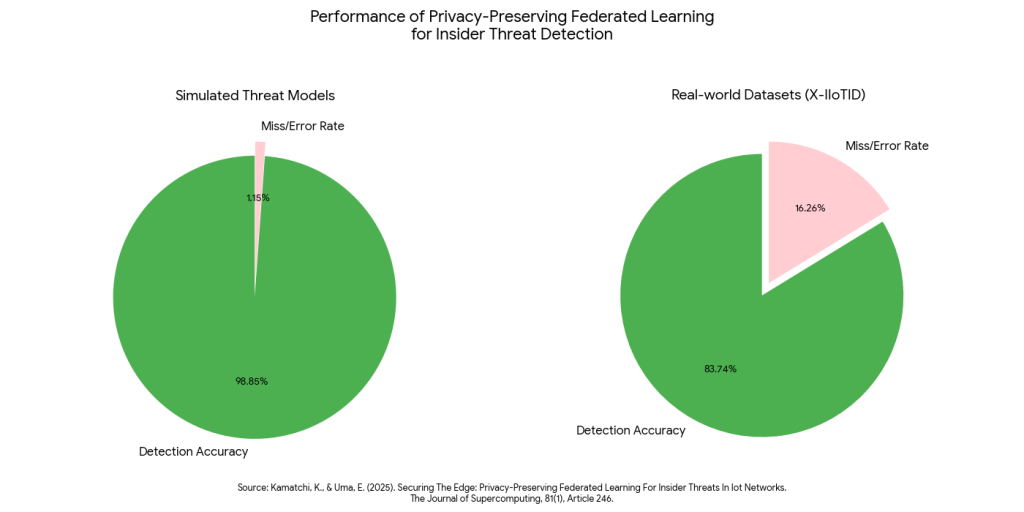
This data proves that organizations can detect “moles” with near-perfect precision without ever decrypting employee identities during the initial analysis phase, effectively validating a “privacy-first” investigation standard.
This is where Anonymization techniques become vital. As discussed in Anonymization vs. Pseudonymization Techniques: A Comprehensive Guide for Modern Data Protection,7 you can use pseudonymization to conduct a preliminary investigation.
Imagine you are looking for a device that is connected to a suspicious IP address at 2:00 AM. Instead of pulling a report with names (“John Doe, iPhone 12”), you pull a report with hashed IDs (“User_7A9F, Device_X22”).
- Analysis: You analyze the hashed logs. You see, “User_7A9F” is the only one who is connected to the bad IP.
- Justification: Now you have “Probable Cause.”
- De-Anonymization: You take this evidence to Legal/HR to unlock the identity of “User_7A9F” and proceed with a targeted investigation.
This tiered approach minimizes privacy intrusion. You didn’t spy on 1,000 employees; you used math to find the one suspect, and only then did you unveil their identity.
Practical Implementation: A 5-Step Framework for Leaders
For business leaders and IT heads, here is a roadmap to secure BYOD forensics for 2025:
1. Audit Your Enrollment
Are your BYOD users just typing in a password, or are they installing a management profile? If they aren’t enrolling in a MAM/MDM solution, you have zero forensic capability. You cannot investigate what you do not manage.
2. Define the “Forensic Boundary”
Sit down with Legal. Draw a line. “We will never look at X, Y, Z.” Write this into the policy. Configure your forensic tools to technically exclude these file types (e.g., exclude *.jpg in the /DCIM/ folder) by default.
3. Enable “Evidence-Grade” Logging
Since you can’t always grab the device, your cloud logs are your primary evidence. Ensure your Office 365 / Google Workspace logs are set to the highest retention and detail level. This is your safety net.
4. Test the “Enterprise Wipe”
Do not wait for a crisis. Get a test device, load it with dummy personal and work data, and issue the wipe command. Verify that the personal data survived. If it didn’t, your configuration is wrong.
5. Update Employee Contracts
The “Reasonable Expectation of Privacy” is often defined by the contract. Ensure your employment agreements explicitly mention the monitoring of work data on personal devices.
Conclusion: Trust is the New Perimeter
The era of the “all-seeing” IT administrator is over. We can no longer treat our employees’ pockets as corporate property.
However, this does not mean we are helpless. By shifting from “Device Control” to “Data Control,” and by using containerization and targeted forensics, we can actually achieve better security. We stop wasting time sifting through vacation photos and start focusing on the data that matters.
In the BYOD era, the most effective forensic strategy is not the one that grabs the most data. It is the one that respects the line between the professional and the personal. When employees trust that you won’t snoop, they are more likely to adopt the security tools that protect everyone.
Is Your BYOD Policy a Forensic Minefield?
Emutare helps organizations transform “Forensic Readiness” from a legal risk into a strategic asset. We navigate the critical balance between investigation and privacy through expert Cybersecurity Governance and Advisory services, helping you craft robust frameworks and policies. Our team specializes in the Implementation of Cybersecurity Controls to enforce effective data containerization, while our Incident Response Planning validates your readiness through proactive forensic drills. Move from reactive device control to confident data security with Emutare.
References
- Emutare. (2025). Shadow Data and Silent Failures: Why Your Cloud Strategy Needs a Forensic Upgrade. https://insights.emutare.com/shadow-data-and-silent-failures-why-your-cloud-strategy-needs-a-forensic-upgrade/ ↩︎
- Osborne Clarke. (2018). GDPR: The practical impact on internal investigations. Osborne Clarke Insights. https://www.osborneclarke.com/insights/gdpr-the-practical-impact-on-internal-investigations/ ↩︎
- LII Supreme Court Resources. (2014). Riley v. California. Justia Supreme Court Center. https://www.oyez.org/cases/2013/13-132 ↩︎
- National Institute of Standards and Technology (NIST). NIST Special Publication 1800-22: Mobile Device Security: Bring Your Own Device (BYOD). NIST NCCoE. https://www.nccoe.nist.gov/publication/1800-22/ ↩︎
- Emutare. (2025). Forensic Readiness: Preparation for Investigations. https://insights.emutare.com/forensic-readiness-preparation-for-investigations/ ↩︎
- Kamatchi, K., & Uma, E. (2025). Securing The Edge: Privacy-Preserving Federated Learning For Insider Threats In Iot Networks. The Journal of Supercomputing, 81(1), Article 246. https://www.researchgate.net/publication/386458506_Securing_the_edge_privacy-preserving_federated_learning_for_insider_threats_in_IoT_networks ↩︎
- Emutare. (2025). Anonymization vs. Pseudonymization Techniques: A Comprehensive Guide for Modern Data Protection. https://insights.emutare.com/anonymization-vs-pseudonymization-techniques-a-comprehensive-guide-for-modern-data-protection/ ↩︎
Related Blog Posts
- Secure CI/CD Pipelines: Design and Implementation
- Certificate-Based Authentication for Users and Devices: A Comprehensive Security Strategy
- IoT Security Challenges in Enterprise Environments
- Future of IoT Security: Regulations and Technologies
- Risk-Based Authentication: Adaptive Security
- IoT Threat Modeling and Risk Assessment: Securing the Connected Ecosystem
- Red Team vs. Blue Team vs. Purple Team Exercises: Strengthening Your Organization’s Security Posture